

Choosing critical risk management software is not mainly a technology decision. It is a decision about how your organisation will connect work, requirements, critical controls, evidence, action and authorised assurance decisions.
The strongest platform is not the one with the longest feature list. It is the one that helps workers, supervisors and leaders see what matters, act on gaps and explain what supports each decision without creating a second, disconnected version of the truth.
What should you look for in critical risk management software?
Australian organisations should evaluate whether a platform can:
- represent the real work and risk context across sites, projects and changing conditions;
- connect applicable requirements to clearly defined critical controls;
- retain trustworthy evidence with its source, owner, time, status and confidence;
- show failed, missing, stale or contradictory evidence without averaging it away;
- route issues to the right authorised person for action, escalation and decision;
- require verification before a control is treated as restored or effective; and
- work simply for the people doing and supervising the work.
Use those outcomes as the core of your evaluation. Features such as dashboards, forms, workflows and AI matter only when they strengthen that operating loop.
Start with the decision the software must support
Before viewing demonstrations, define the decisions your organisation needs to make. Examples include whether planned work can proceed, whether a critical control requires attention, who has authority to respond, what must be verified and what evidence leaders need for assurance.
Then map the information required for each decision. This prevents the evaluation from becoming a comparison of attractive dashboards and generic module lists.
Describe the operating moment
Ask vendors to demonstrate the platform in a realistic situation: a worker or supervisor at the point of work, a reviewer assessing incomplete evidence, or a leader examining an unresolved critical-control gap. Include the conditions your people actually face, such as limited time, varying digital literacy, shared devices, field movement or unreliable connectivity.
A strong demonstration should make the next action, authority and evidence requirement clear. It should not hide uncertainty to make the workflow appear simple.
Evaluate the complete context-to-assurance loop
1. Work and risk context
Can the platform represent the organisation, site, project, work activity, people, equipment and changing conditions that affect risk? A control cannot be evaluated meaningfully when it is separated from the work it is intended to control.
Test whether users can move from an operating problem to the relevant requirements and controls without searching several disconnected modules.
2. Requirements and critical controls
Can the organisation define which requirements apply, which controls are critical and what acceptable performance looks like? The platform should preserve relationships between hazards or unwanted events, requirements, controls, accountable roles and verification activities.
Do not assume a completed checklist proves a control is effective. Ask how the system distinguishes an activity from evidence about control performance.
3. Trustworthy evidence
Evidence should retain enough context to be relied upon. Ask whether the platform records who supplied or reviewed it, when it was created, what it relates to, whether it is current, and whether any contradiction or limitation remains.
Look closely at how missing, expired, conflicting or low-confidence evidence is displayed. These states should remain visible and should not be converted into a favourable score by default.
4. Explainable control health and readiness
Ask the vendor to explain exactly how the platform derives each status. Can an authorised reviewer trace a status back to the requirements, evidence and rules that produced it? Can they see what is unknown as well as what has passed?
Critical conditions should follow worst-first logic. A mandatory failed or unknown condition should not disappear inside an average of otherwise favourable results.
5. Governed action and authorised decisions
When a gap appears, the platform should route it to the right person with the context intact. Check how ownership, due dates, escalation, review and decision authority are assigned and recorded.
Completion of an action is not the same as restoration of a control. Ask what verification is required, who may perform it and how the final decision is recorded.
6. Verification, assurance and learning
Can the organisation independently verify what changed and why? Look for a durable history of evidence, actions, reviews and authorised decisions. The platform should help teams learn from repeated gaps without rewriting past records.
Board and executive reporting should allow leaders to examine the basis of assurance, not only totals, completion percentages or traffic-light summaries.
Check alignment with Australian WHS risk management
Safe Work Australia’s risk management guidance describes a process of identifying hazards, assessing risks where necessary, controlling risks and reviewing control measures. It also emphasises consultation with workers and health and safety representatives throughout the process.
Your software should support that work, but software does not determine whether an organisation has met its legal duties. WHS requirements vary by jurisdiction and operating context. Professional and legal advice may still be required.
During evaluation, ask:
- How does the platform support worker consultation and show how feedback influenced a decision?
- How are control measures reviewed to confirm they work as planned?
- How are changes in work, new hazards and new evidence reflected?
- Can shared responsibilities and handovers between duty holders be made explicit?
- Can the organisation retrieve the decision and evidence trail without reconstructing it manually?
Consider ISO 45001 alignment without overstating it
ISO 45001:2018 provides a framework for an occupational health and safety management system, including leadership, worker participation, hazard identification, risk assessment, operational control, performance evaluation and continual improvement.
A platform may support these processes by connecting requirements, controls, evidence, monitoring and review. It does not certify an organisation, guarantee compliance or replace the organisation’s management system, competent advice or certification audit.
Ask the vendor to demonstrate how its workflow supports your existing system. Avoid allowing the software to become a parallel compliance engine that conflicts with approved procedures, registers or authorities.
Test frontline usability in real work
Frontline time and attention are limited. A platform may be comprehensive and still fail if workers and supervisors cannot use it under normal operating pressure.
In a demonstration, measure:
- the steps and time needed to find the relevant work and control;
- the typing and duplicate entry required;
- whether instructions and evidence requirements are clear;
- how the interface handles poor connectivity, shared devices and interruptions;
- whether a person can report a problem without choosing from confusing categories; and
- whether the person who raised an issue can see an appropriate response.
Use representative workers and supervisors in the evaluation. Their feedback should influence configuration and implementation, not be collected after the buying decision.
Protect one authoritative operating picture
Integration is not simply about moving data between systems. It is about preserving identity, authority, relationships, provenance and history.
Clarify which system owns each record and how the proposed platform will connect with existing document control, workforce, asset, project or reporting systems. Ask what happens when records conflict, permissions change or an integration is unavailable.
Also review:
- tenant and site separation;
- role-based access and least privilege;
- audit history and retention;
- data export and portability;
- backup, recovery and service continuity;
- security responsibilities; and
- how sensitive worker or operational information is handled.
Set clear boundaries for AI and automation
AI may help people find information, identify gaps or prepare a review. It should not declare work safe, determine legal compliance, approve a permit, accept residual risk or replace the authorised decision-maker.
Ask vendors to show:
- what information the AI uses and where it came from;
- how uncertainty and limitations are presented;
- whether an authorised person reviews material recommendations;
- what actions the AI can and cannot take;
- how prompts, outputs and approvals are logged; and
- how customer data is separated, retained and protected.
The accountability boundary should be obvious to every user: AI assists; accountable people remain in control.
Run a proof-led pilot before broader rollout
A pilot should test the operating workflow, not simply confirm that users can log in or complete forms. Choose a bounded site, project or critical-risk workflow with approved data, named decision-makers and a rollback path.
Establish a baseline before the pilot. Useful measures can include:
- time required to find and review relevant evidence;
- evidence completeness and currency;
- contradictions or critical gaps identified;
- decision and escalation latency;
- time to verified control restoration;
- duplicate entry and avoidable rework; and
- frontline usability and adoption in the operating moment.
Keep activity counts separate from control effectiveness. More uploads, inspections or completed actions do not by themselves demonstrate better assurance.
Questions to ask every vendor
- Show us one complete workflow. Start with the work and risk context, then follow the requirement, critical control, evidence, action, authorised decision and verification.
- Show us a failed or unknown condition. Demonstrate how the platform prevents it from being averaged away or presented as satisfactory.
- Show us the evidence trail. Trace a status back to its source, owner, time, confidence and review history.
- Show us the authority model. Explain who may act, verify, escalate and decide.
- Show us a frontline task. Use a realistic scenario and count the steps, choices and duplicate entries.
- Show us a changed condition. Demonstrate what happens when work, people, equipment, requirements or evidence changes.
- Show us the AI boundary. Explain what the system recommends, what it cannot decide and where human approval is required.
- Show us how data leaves the platform. Explain export, retention, audit history and transition arrangements.
How SafetyNettIQ approaches the problem
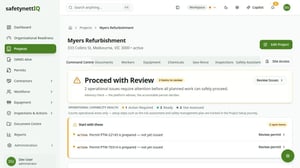
SafetyNettIQ, powered by Work Safety Hub, is positioned around governed critical-risk intelligence and assurance. It connects work context, requirements, critical controls and trustworthy evidence so authorised people can see gaps, act, verify and decide.
The platform’s role is to support an explainable, governed decision process. It does not replace accountable people, professional judgement or applicable legal, engineering and certification processes.
When comparing SafetyNettIQ with another approach, use the same evaluation framework in this guide. Ask for one complete workflow using demonstration data relevant to your operating context.
Choose evidence before claims
The final decision should be based on demonstrated workflows, supportable evidence and a realistic implementation plan. Avoid selecting software solely on a feature checklist, generic maturity score or polished dashboard.
Choose the platform that makes critical uncertainty visible, gives the right people a clear next action and preserves the evidence and authority behind each decision.
Next step: Book a tailored SafetyNettIQ demonstration focused on one critical-risk workflow in your organisation. Requesting a demonstration does not create an account, subscription or payment obligation.
You can also explore SafetyNettIQ and its governed context-to-assurance approach.
Frequently asked questions
What is critical risk management software?
It is software used to connect high-consequence risk context, critical controls, evidence, action and assurance decisions. Capabilities vary, so buyers should evaluate the complete workflow rather than assume a product category guarantees a particular method.
Does critical risk management software make an organisation WHS compliant?
No. Software can support risk management, consultation, evidence, monitoring and review. It cannot determine that an organisation has met every legal duty or replace accountable decision-makers and competent advice.
How can software support ISO 45001?
Software may support processes such as hazard identification, operational control, monitoring, review and continual improvement. Alignment depends on how the organisation configures and uses the platform within its management system.
What evidence should a buyer request during a demonstration?
Request an end-to-end workflow using approved demonstration data. Check the source and status of evidence, the treatment of missing or contradictory information, the authority model, the verification step and the retained audit history.
How should organisations compare vendors?
Use the same realistic operating scenario, questions and success measures for each vendor. Include representative workers, supervisors, authorised reviewers, safety leaders, operations leaders, IT and security where relevant.